How to Build a Simple Smart Home Energy-Saving System
A smart home doesn’t have to mean dozens of expensive devices, complicated automations, or a large home energy-management system.
You can start with a few strategically chosen devices that help you monitor electricity use, control major energy loads, and automate simple energy-saving routines.
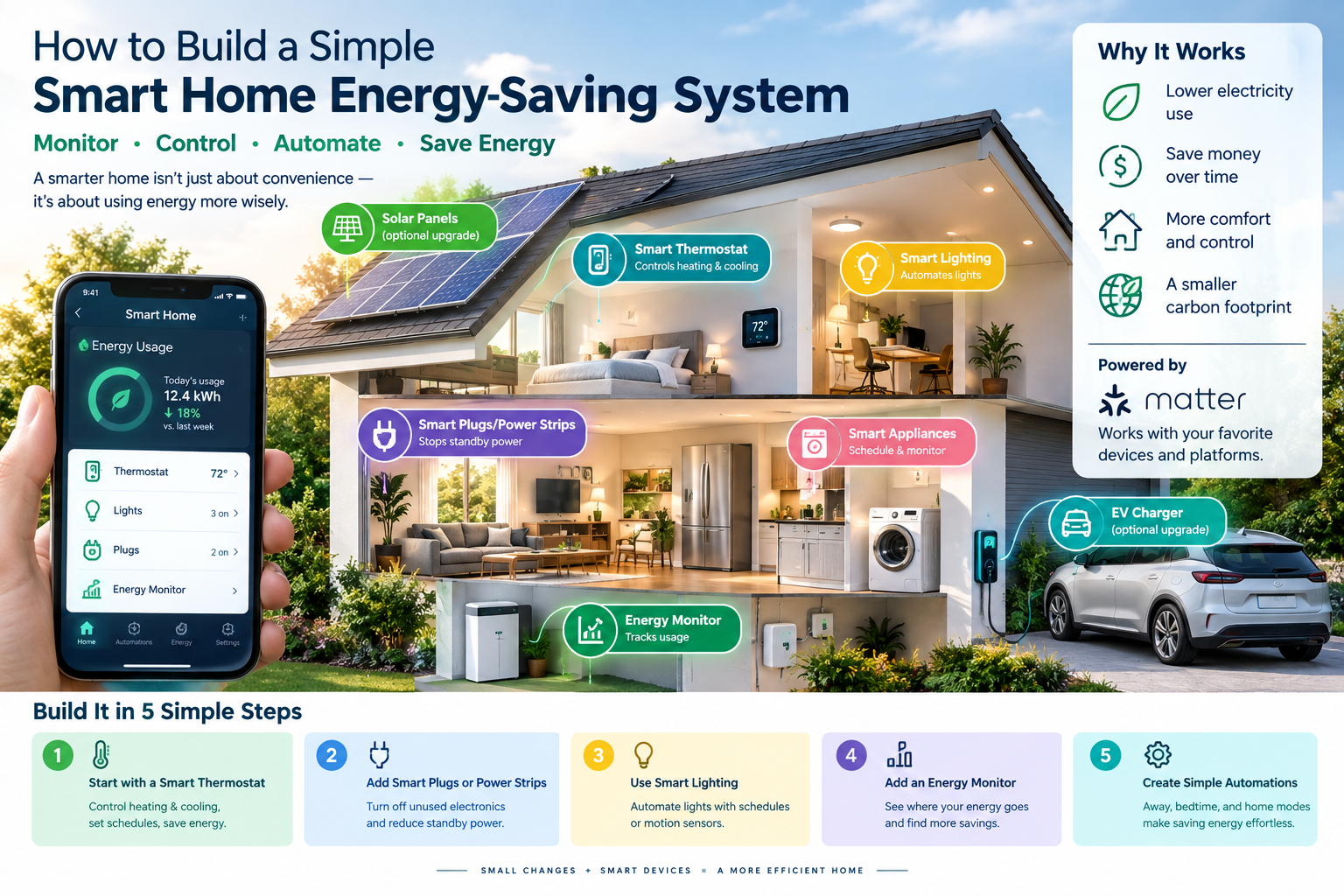
A practical smart home energy-saving system can begin with just a smart thermostat, a few smart plugs or power controls, smart lighting, and some basic automations. As your needs grow, you can add energy monitoring, smart appliances, solar, battery storage, EV charging, and other energy-management equipment.
The key is to build the system around actual energy use rather than simply buying smart devices because they are convenient.
This guide explains how to build a simple system step by step, how to choose the right devices, how to create useful automations, and how to determine whether your smart home is actually reducing energy consumption.
What Is a Smart Home Energy-Saving System?
A smart home energy-saving system uses connected devices, sensors, software, and automation to help you monitor and control how energy is used in your home.
Instead of manually turning everything on and off, you can create rules based on:
- Time
- Occupancy
- Temperature
- Device usage
- Energy consumption
- Your daily routine
- Electricity prices, where supported
For example, you could create an automation that turns off selected electronics when everyone leaves home.
Another could adjust the thermostat when you’re away.
A third could turn selected lights off automatically at bedtime.
The idea isn’t to make your house “smart” for its own sake. The goal is to reduce unnecessary energy use while maintaining comfort and convenience.
ENERGY STAR describes smart-home energy-management systems as systems that can schedule devices, suggest energy-saving actions based on usage patterns, and automatically control devices based on occupancy.
How Much Can a Smart Home Save on Energy?
There is no single savings number that applies to every home.
Your potential savings depend on:
- Your climate
- Home size
- HVAC system
- Electricity rates
- Occupancy patterns
- Existing energy efficiency
- Device settings
- How much electricity your appliances consume
- How effectively you use automation
Heating and cooling deserve particular attention because they are a major source of household energy consumption. ENERGY STAR says nearly half of the energy used in a typical home goes toward heating and cooling.
ENERGY STAR-certified smart thermostats are independently certified using real-world data. ENERGY STAR currently says an average home can save approximately 8% of heating and cooling bills with a certified smart thermostat, although actual results vary by home and usage.
This is why a good energy-saving smart home should focus on high-impact loads first.
The Simple Smart Home Energy-Saving System
You don’t need to buy everything at once.
A practical starter system can contain these five elements:
- Smart thermostat
- Smart plugs or smart power strips
- Smart lighting
- Energy monitoring
- Simple automations
You can later add:
- Smart appliances
- EV charging
- Solar
- Home batteries
- Smart water heating
- Heat pumps
- Advanced energy-management systems
Let’s look at each part.
Step 1: Start With a Smart Thermostat
If your home has central heating or cooling, a smart thermostat is one of the most useful places to begin.
A smart thermostat can let you:
- Adjust temperature remotely
- Create schedules
- Detect occupancy
- Use away settings
- Learn temperature preferences on some models
- Monitor HVAC operation
- Participate in certain utility programs
ENERGY STAR-certified smart thermostats are required to provide scheduling and feedback about the energy consequences of settings, and they are independently evaluated for energy savings.
Why Start With the Thermostat?
Heating and cooling can account for a very large portion of household energy consumption.
That means a small improvement in HVAC operation can have more impact than automatically turning off a few small electronic devices.
For example, imagine that your house is empty from 8 AM to 5 PM.
Instead of maintaining the same temperature all day, a smart thermostat could use an away schedule or occupancy-based automation to reduce heating or cooling when it isn’t needed.
The thermostat can then return the home toward your preferred temperature before you arrive.
Check Compatibility Before Buying
Don’t assume every smart thermostat works with every HVAC system.
Before purchasing one, check:
- Heating system type
- Cooling system type
- Heat-pump configuration
- Number of heating/cooling stages
- Wiring
- C-wire requirements
- Manufacturer compatibility
ENERGY STAR specifically recommends checking thermostat compatibility with your heating and cooling system before purchasing.
If you’re uncertain about the wiring or HVAC configuration, consult the thermostat manufacturer or a qualified HVAC professional.
Step 2: Add Smart Plugs for High-Use Electronics
Smart plugs are inexpensive ways to add automation to individual appliances and electronics.
They can be useful for devices such as:
- Entertainment systems
- Desk equipment
- Lamps
- Small appliances
- Chargers
- Fans
- Certain office equipment
A smart plug can allow you to schedule when a connected device receives power or monitor its electrical usage, depending on the model.
Example Automation
You could create:
10:30 PM → Turn off entertainment-center smart plug
This can prevent selected electronics from remaining powered when nobody is using them.
The U.S. Department of Energy notes that some products consume electricity even when they appear to be turned off. This is commonly called standby power.
The DOE also recommends using power strips or smart power strips for certain electronics to help eliminate unnecessary standby consumption.
Don’t Put Everything on a Smart Plug
This is important.
Don’t automatically connect every household device to a smart plug.
Avoid switching off devices that need continuous operation unless the manufacturer specifically supports that type of control.
Examples may include:
- Refrigerators
- Freezers
- Medical equipment
- Security systems
- Network equipment
- Devices that require continuous power for safe operation
Before automating an appliance, check the manufacturer’s instructions.
A smart home should reduce waste without creating new problems.
Step 3: Use Smart Power Strips for Entertainment Areas
A smart power strip can be especially useful around electronics.
Consider a typical entertainment area:
- Television
- Game console
- Speakers
- Streaming device
- Blu-ray player
- Subwoofer
Some of these devices may continue drawing power when they are not actively being used.
The DOE identifies standby power as electricity consumed while products are in low-power or standby modes.
A smart power strip can help manage selected loads automatically.
For example:
When the TV is turned off → switch off selected entertainment equipment after a delay.
Another option is:
11:00 PM → Turn off entertainment-center outlets.
The best setup depends on which devices need continuous power.
Step 4: Add Smart Lighting
Smart lighting isn’t necessarily the biggest energy-saving upgrade in every home, but it can make it easier to avoid lights being left on unnecessarily.
Smart lights and switches can be controlled using:
- Schedules
- Motion or occupancy
- Phone apps
- Scenes
- Voice controls
- Home/away automations
ENERGY STAR identifies smart lighting as one component of smart-home energy management and notes that connected lighting can be remotely controlled and scheduled.
Useful Lighting Automation
Instead of creating complicated routines, start with simple rules.
Automation 1: Hallway lights
No motion for 10 minutes → Turn off hallway lights.
Automation 2: Outdoor lights
Sunset → Turn on outdoor lights.
Sunrise → Turn them off.
Automation 3: Bedroom
11:30 PM → Turn off selected bedroom lights.
The goal is simple:
Lights should operate when needed and turn off when they aren’t.
Step 5: Add an Energy Monitor
If you want to build a genuinely useful energy-saving system, don’t rely entirely on guesswork.
An energy monitor can help you understand where electricity is going.
Depending on the product, you may be able to monitor:
- Whole-home electricity consumption
- Individual circuits
- Appliance consumption
- Current power demand
- Historical usage
- Energy trends
This creates an important feedback loop:
Measure → Identify → Automate → Measure again
Without measurement, you may spend money on smart devices without knowing whether they are making a meaningful difference.
What Should You Measure First?
Start with large or frequently used loads.
Depending on your home, these might include:
- HVAC
- Water heating
- Refrigerator
- Freezer
- Clothes dryer
- Washing machine
- Pool equipment
- Home office
- Entertainment equipment
You don’t necessarily need to monitor every outlet.
Focus on the loads most likely to affect your electricity consumption.
Step 6: Connect Everything to One Smart-Home Ecosystem
Once you have several devices, managing them individually becomes inconvenient.
This is where a smart-home platform becomes useful.
You can use a compatible ecosystem or controller to create routines involving multiple devices.
For example:
Away Mode
When everyone leaves:
- Adjust thermostat
- Turn off selected lights
- Turn off selected entertainment devices
- Disable unnecessary plug loads
Bedtime Mode
At bedtime:
- Turn off downstairs lights
- Turn off entertainment equipment
- Adjust thermostat
- Keep essential devices running
Morning Mode
At wake-up time:
- Adjust thermostat
- Turn on selected lights
- Restore selected devices
The important part is to automate actions you already know you want, rather than creating dozens of complicated routines.
Where Does Matter Fit Into This System?
Matter can be particularly useful if you want greater interoperability between compatible smart-home devices.
Matter is an open smart-home standard designed to help compatible devices communicate across ecosystems.
For energy management, Matter has evolved significantly.
Matter 1.3 introduced energy reporting and support for energy-management use cases involving major appliances and EV supply equipment. Matter 1.4 expanded support to solar systems, batteries, heat pumps, water heaters, and additional energy-management capabilities.
Matter 1.5 then added standardized information around energy pricing, tariffs, and grid carbon intensity, allowing compatible devices and energy services to exchange more detailed energy information.
Matter 1.6 was released in June 2026 and focuses on improvements such as device capability communication, ecosystem coordination, and context-driven control.
This makes Matter particularly relevant if you’re building a smart home that you expect to expand over time.
Should You Buy Matter Devices?
If you’re starting from scratch, Matter compatibility can be a useful consideration.
However, don’t buy a product simply because it has the Matter logo.
Look at the specific capabilities you need.
For an energy-saving system, check whether the product supports:
- Energy measurement
- Power measurement
- Scheduling
- Occupancy automation
- Energy-management features
- Your preferred smart-home platform
- Firmware updates
- Local control, if important to you
Two devices can both support Matter while offering different capabilities.
Matter provides the communication standard; manufacturers and platforms still determine which features they implement and expose.
Step 7: Create Your First Five Energy-Saving Automations
You don’t need 50 automations.
Start with five.
Automation #1: Away Thermostat
Trigger: Everyone leaves home.
Action: Adjust the thermostat to an energy-saving setting.
This is particularly useful for homes that are empty for several hours.
Automation #2: Nighttime Electronics
Trigger: 11:00 PM.
Action: Turn off selected entertainment and office equipment.
This can reduce unnecessary standby consumption.
Automation #3: Lights Off
Trigger: No occupancy or motion for a specified period.
Action: Turn off selected lights.
Automation #4: Morning Lighting
Trigger: Sunrise or wake-up time.
Action: Turn off exterior lights and restore selected indoor lighting.
Automation #5: Home/Bedtime Mode
Trigger: Household bedtime routine.
Action:
- Turn off unnecessary lights
- Turn off selected electronics
- Adjust thermostat
- Leave essential devices operating
These simple routines can create most of the convenience you’ll need without making your system difficult to maintain.
Step 8: Use Schedules Instead of Constant Manual Control
One major advantage of smart-home automation is that it turns energy-saving behavior into a routine.
Consider a device you use every weekday.
If you manually turn it off every evening, there’s a chance you’ll eventually forget.
A schedule can handle it automatically.
For example:
Weekdays, 10:30 PM → Turn off office equipment
Weekdays, 7:00 AM → Restore power
This approach is especially useful for predictable routines.
However, avoid creating schedules that conflict with how your household actually lives.
A system that repeatedly turns off devices when people need them will eventually be disabled.
The best automation is one that works quietly in the background.
Step 9: Use Occupancy to Save Energy
Occupancy detection can make smart-home energy management more responsive.
Instead of relying only on fixed schedules, the system can react to whether people are actually home.
For example:
Nobody home → energy-saving mode
Someone returns → normal mode
Occupancy can be particularly useful for:
- Lighting
- Thermostats
- Fans
- Selected electronics
ENERGY STAR identifies occupancy-based automatic control as one of the functions that can be used in smart-home energy-management systems.
But don’t make your automations too aggressive.
A room being empty for five minutes doesn’t necessarily mean the occupants have left the house.
Use appropriate delays and occupancy logic.
Step 10: Track Your Results
This is one of the most important steps.
After installing your smart-home devices, monitor your electricity consumption.
Compare your usage before and after making changes.
Ideally, compare similar periods while accounting for factors such as:
- Weather
- Occupancy
- HVAC use
- Seasonal changes
- Electricity rates
- Major appliance changes
Don’t assume that a lower electricity bill automatically means your smart-home system saved money.
Your utility rate may have changed.
Likewise, a higher bill doesn’t necessarily mean the automation failed.
You may have experienced unusually hot or cold weather.
Look at energy consumption, not just the dollar amount.
A Simple Smart Home Energy-Saving Setup on a Budget
You can build your system gradually.
Stage 1: Basic
Start with:
- Smart thermostat
- 2–4 smart plugs
- Smart bulbs or switches
- One smart-home platform
Create:
- Away mode
- Bedtime mode
- Lighting schedules
- Electronics schedules
Stage 2: Monitoring
Add:
- Whole-home energy monitor
- Energy-monitoring smart plugs
Now you can identify which devices consume the most electricity.
Stage 3: Advanced
Add:
- Smart appliances
- EV charger
- Smart water heater
- Heat pump controls
- Solar monitoring
- Battery storage
At this point, you’re moving from basic smart-home automation toward a more comprehensive home energy-management system.
A More Advanced Matter Energy Management Setup
If you have solar, batteries, an EV, or other major electrical loads, Matter’s newer energy-management capabilities become more interesting.
Matter 1.4 added support for solar power systems, battery storage, heat pumps, water heaters, and enhanced EV charging preferences. It also introduced Device Energy Management features that can help energy-consuming devices adjust their operation based on forecasts and power-management needs.
Matter 1.5 expanded this further by allowing standardized energy pricing, tariff, and grid-carbon information to be shared with compatible devices and energy services.
A future-oriented setup could therefore look like:
Solar panels → Home energy system → Battery
while also connecting:
EV charger + water heater + heat pump + smart appliances
The system can potentially coordinate these devices around energy availability, user preferences, tariffs, and other conditions.
This is considerably more advanced than a few smart plugs, but it illustrates where smart-home energy management is heading.
How to Save Energy Without Making Your Home Complicated
The biggest mistake is trying to automate everything.
Instead, use this rule:
Automate the biggest repeatable energy waste first.
For example:
If your HVAC system uses far more energy than your desk electronics, focus on HVAC automation before spending hours optimizing a computer setup.
If your entertainment system is frequently left on, a smart power strip may be worthwhile.
If lights are regularly left on, occupancy or scheduled lighting can help.
If you have solar and an EV, energy-aware EV charging may eventually offer a much bigger opportunity than controlling individual lights.
Common Mistakes to Avoid
Mistake 1: Buying too many devices
More smart devices don’t automatically mean more energy savings.
Start small.
Mistake 2: Ignoring your largest energy loads
A smart bulb isn’t going to compensate for inefficient HVAC equipment.
Focus on major energy consumers first.
Mistake 3: Automating essential appliances
Don’t randomly switch off devices that need continuous operation.
Mistake 4: Creating too many automations
Complex systems are harder to maintain.
Start with a handful of reliable routines.
Mistake 5: Ignoring compatibility
Check whether the device works with your smart-home platform and HVAC or electrical system.
Mistake 6: Assuming Matter means every feature works everywhere
Matter improves interoperability, but specific capabilities still depend on device and ecosystem implementation.
Mistake 7: Measuring only your bill
Electricity prices can change.
Track energy consumption when possible.
Smart Home Energy-Saving System: What to Buy First
Here’s a practical priority list.
| Device | Main purpose | Priority |
|---|---|---|
| Smart thermostat | Automate heating/cooling | High |
| Smart plugs | Control selected electronics | High |
| Smart power strip | Manage entertainment/office loads | Medium |
| Smart lights/switches | Automate lighting | Medium |
| Energy monitor | Identify electricity use | High |
| Smart appliances | Improve scheduling/control | Later |
| EV charger | Manage EV charging | If you own an EV |
| Solar integration | Manage solar production | If you have solar |
| Battery storage | Store electricity | Advanced |
| Smart water heater | Manage water-heating energy | Advanced |
The exact priority will depend on your home.
For many households, the combination of HVAC control + energy monitoring + selected plug-load control is a more logical starting point than buying a large collection of smart bulbs and sensors.
Can Smart Home Automation Really Reduce Electricity Use?
It can, but automation is not magic.
A smart device saves energy only when it changes behavior or operation in a way that reduces energy consumption.
For example:
Smart thermostat + better temperature scheduling = potential HVAC savings
Smart plug + unnecessary standby load = potential plug-load savings
Occupancy lighting + lights regularly left on = potential lighting savings
EV scheduling + suitable electricity tariff = potential charging-cost optimization
But if a smart device is simply installed and never changes how your home operates, its energy-saving impact may be small.
The goal should always be:
Identify waste → automate the solution → measure the result.
What About Smart Appliances?
Connected appliances can become part of a broader energy-management system.
ENERGY STAR identifies connected functionality across categories including refrigerators, freezers, clothes washers, clothes dryers, dishwashers, pool pumps, ceiling fans, and electric vehicle chargers.
The important feature isn’t simply smartphone control.
Look for useful capabilities such as:
- Scheduling
- Energy monitoring
- Delay start
- Demand response
- Energy-use feedback
- Integration with your smart-home ecosystem
For example, a washing machine with a flexible start time may be more useful for energy management than one that simply lets you press “Start” from your phone.
The Future: From Smart Devices to a Smart Energy Home
The long-term direction of smart-home energy management is broader than individual device control.
Imagine a home that understands:
- When people are home
- How much electricity is being used
- How much solar energy is being generated
- How much energy is stored in the battery
- When the EV needs to be ready
- When flexible appliances can run
- What electricity costs
- What the homeowner’s preferences are
Matter is moving toward this kind of interoperability.
Matter 1.5 introduced standardized tariff and grid-carbon information, while Matter 1.6 added more context-aware control and improved communication of device capabilities and operational limits.
The result could be a home where energy decisions happen automatically instead of requiring homeowners to constantly monitor individual devices.
Frequently Asked Questions
What is the easiest way to start a smart home energy-saving system?
Start with the largest practical energy-saving opportunities. For many homes, that means a compatible smart thermostat, a few smart plugs or power controls, smart lighting, and some basic automations.
Do smart plugs really save electricity?
A smart plug doesn’t automatically reduce electricity consumption. It can help by switching selected devices off when they’re not needed or by scheduling their operation. The DOE notes that some electronics consume standby power even when they appear to be turned off.
Is a smart thermostat worth adding?
For homes with significant heating or cooling use, a smart thermostat can be a useful part of an energy-saving strategy. ENERGY STAR-certified models are independently evaluated for energy savings using real-world data.
Do I need Matter for an energy-saving smart home?
No. You can build an energy-saving smart home without Matter. Matter is useful when you want compatible devices from different manufacturers and ecosystems to communicate using a common standard.
What is the best smart home device for saving energy?
There isn’t one device that is best for every home. Heating and cooling are major energy users, so a smart thermostat can be a high-impact starting point for homes that use substantial HVAC energy.
Can Matter control solar panels and batteries?
Matter’s energy-management capabilities have expanded to include solar and battery-related device types. Matter 1.4 added these capabilities to the standard. Actual functionality depends on compatible hardware and ecosystem support.
Can a smart home automatically use electricity when it is cheaper?
Compatible energy-management systems can potentially use tariff and pricing information for automation. Matter 1.5 introduced standardized energy tariff information, including real-time and forecasted pricing data.
Should I buy all the devices at once?
No. Building the system in stages is usually simpler. Start with your biggest energy-saving opportunity, measure the results, and then expand.
Final Takeaway
Building a smart home energy-saving system doesn’t require turning your entire house into a complicated technology project.
Start with a simple foundation:
1. Control heating and cooling with a compatible smart thermostat.
2. Use smart plugs or power strips for selected electronics.
3. Automate lights with schedules or occupancy.
4. Add energy monitoring so you know where electricity is going.
5. Create a few simple home, away, and bedtime routines.
Then measure your electricity consumption and expand the system only where it makes sense.
If you are building a new smart home, Matter is worth considering because its energy-management capabilities are becoming more sophisticated. Matter 1.4 expanded support for solar, batteries, heat pumps, water heaters, EV charging, and energy-consuming devices, while Matter 1.5 added standardized energy pricing, tariff, and grid-carbon information.
But the most important principle remains simple:
Don’t buy smart devices just because they’re smart. Buy them because they solve a specific energy problem.
A good smart home should make energy saving automatic, measurable, and easy to live with.