How to Monitor a Sump Pump With a Smart Water Sensor
A sump pump helps protect a basement or crawl space by removing water that collects in a sump pit. But what happens when the pump stops working during heavy rain, a power outage, or a period when nobody is home?
Without a reliable warning system, a problem may go unnoticed until water reaches the floor.
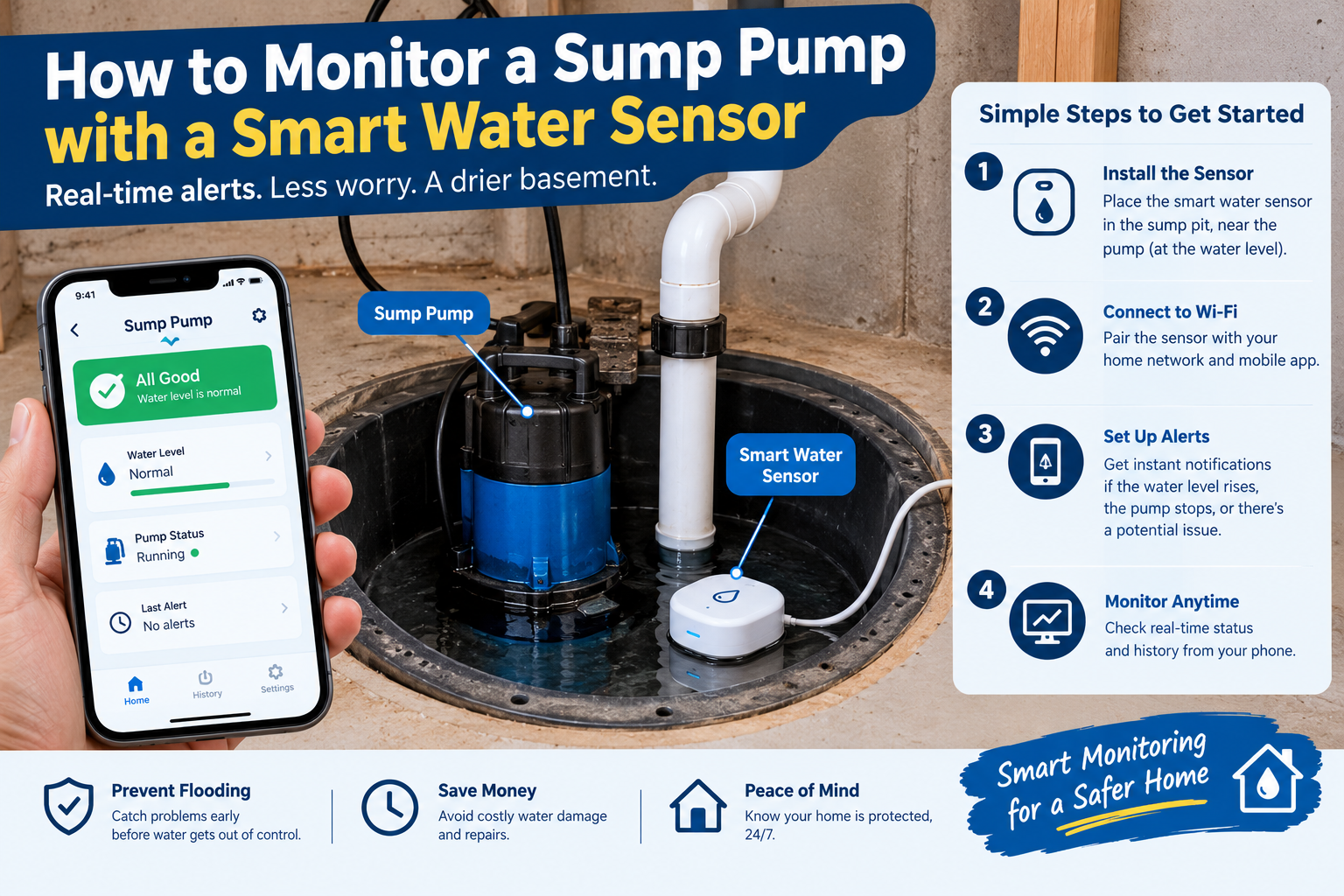
A smart water sensor for a sump pump can help you monitor water levels, detect moisture, and receive alerts on your phone when something needs attention. The right setup depends on whether you want to detect water in the basement, monitor the water level inside the sump pit, or check the pump’s operating condition.
In this guide, you’ll learn how to monitor a sump pump with a smart water sensor, where to position the device, how to configure alerts, how to test the system, and which additional safeguards can help reduce the risk of basement flooding.
What Is a Smart Water Sensor for a Sump Pump?
A smart water sensor is a connected device that detects water or changes in water level and communicates that information through an alarm, mobile app, or other notification system.
For sump pump monitoring, there are three main options.
1. Smart water leak sensor
A basic leak sensor detects water when moisture reaches its sensing contacts or probe. You can place it near the sump pit, at a low point on the basement floor, or in another location where water may collect.
Depending on the model, it may send a smartphone notification, sound a local alarm, or both.
Best for: Detecting water that has escaped onto the floor.
Its main limitation is that it may not alert you until water has already reached the sensor.
2. Sump pit water-level sensor
A water-level sensor monitors the water inside the sump basin. Depending on its design, it may detect when water rises above a selected threshold or provide ongoing water-level readings.
Some dedicated sump monitors can also identify unusual water-level patterns and notify you when the system may be struggling to remove water.
Best for: Detecting rising water inside the sump pit before it reaches the basement floor.
3. Dedicated smart sump pump monitor
A dedicated sump pump monitor may combine water-level measurements with pump activity, electrical monitoring, or power-status alerts.
For example, Moen describes a monitoring system that uses a water-level sensor, pump-performance monitoring, and a separate moisture sensor near the basin. Other systems offer different combinations of features, so check the specifications of the model you choose.
Best for: Homeowners who want a more comprehensive view of sump pump operation rather than a simple water-on-the-floor alarm.
The important point is that these devices are not interchangeable. Choose one based on the failure you most want to detect.
How to Monitor a Sump Pump With a Smart Water Sensor
Follow these steps to set up a practical monitoring system.
Step 1: Identify what you need to monitor
Before buying a sensor, consider the main risk in your home.
* If you’re worried about water leaking onto the basement floor, start with a leak sensor.
* If you’re worried that the sump pit may fill too high, look for a dedicated water-level sensor or high-water alarm.
* If you want to know whether the pump is operating abnormally, choose a monitor that explicitly supports pump-performance monitoring.
* If power outages are a concern, check whether the system detects power loss and whether it can still alert you during an outage.
A single sensor may not detect every possible failure. For more complete coverage, you may need more than one monitoring method.
Step 2: Choose a compatible smart sensor
Check the manufacturer’s specifications before purchasing.
Look for these features:
* Remote alerts: Notifications through an app, text message, or another supported method.
* High-water alerts: A warning when the water rises above a configured threshold.
* Local alarm: A sound that can warn someone in the house even if a phone notification is missed.
* Connectivity monitoring: An indication that the device has lost its network connection.
* Power-loss monitoring: A warning when supported equipment loses electrical power.
* Battery backup: Backup power for the monitoring device, if available.
* Sump compatibility: Confirmation that the sensor is designed for the intended location and water conditions.
Do not assume that every smart leak detector supports submerged use, continuous water-level measurement, or pump-performance monitoring. Follow the product’s stated installation and operating limits.
Step 3: Install the sensor in the correct location
The correct position depends on the type of sensor.
For a floor-level leak sensor:
1. Choose a low point near the sump pit where escaping water is likely to collect.
2. Keep the sensor away from normal splashes and routine cleaning water.
3. Make sure its sensing contacts can come into contact with water.
4. Confirm that the device is within the manufacturer’s permitted operating environment and wireless range.
For a sump water-level sensor:
1. Read the manufacturer’s installation instructions before placing anything inside the pit.
2. Position the sensor so it measures the water correctly and does not point toward the pump, basin wall, or discharge pipe if those objects interfere with its readings.
3. Secure any mounting hardware as instructed.
4. Set the high-water threshold according to the equipment layout and manufacturer’s guidance.
For example, Moen’s instructions for its water-level sensor specify aiming the sensor at the water surface and avoiding obstructions. Other designs may use a float, pressure probe, or different sensing method, so do not copy a mounting method from one product to another. <Cite refs={[“turn134456search14”]} />
Safety note: Do not reach into a wet sump pit or handle electrical equipment in standing water. Keep electrical connections dry, and use a qualified professional if installation requires modifying pump wiring, outlets, or fixed electrical equipment.
Step 4: Connect the sensor to its app
For a Wi-Fi-enabled device, the setup usually involves installing the manufacturer’s app, adding the device, and connecting it to the supported network.
Follow the instructions supplied with your particular model.
After pairing the sensor:
1. Give it a clear name, such as “Basement Sump Pit.”
2. Check the displayed device status.
3. Confirm that the app reports a healthy connection.
4. Enable the notifications you need.
5. Add another trusted recipient if the system supports multiple contacts.
If the sensor uses a dedicated hub or a different wireless protocol, make sure the hub is installed and connected as instructed.
Step 5: Configure useful alerts
A sensor is only useful if its warnings are appropriate and reach someone who can respond.
Where supported, enable alerts for:
* High water in the sump pit.
* Water detected on the basement floor.
* Power interruption.
* Device battery running low.
* Lost network connection.
* Abnormal pump operation.
* Backup pump problems.
Not every device supports all these alerts. Review its available settings instead of assuming they are included.
For high-water alerts, choose a threshold that gives you time to respond without producing frequent false alarms. Follow the manufacturer’s instructions and consider the pump’s normal operating level, float-switch position, and the amount of water the pit can safely accommodate.
If you are unsure about the correct threshold or safe water level, ask a qualified sump pump technician to help configure it.
Step 6: Test the complete notification system
Never assume that a sensor is working simply because it appears online in the app.
Test the complete chain: the sensor detects the condition, the device processes it, and the warning reaches the intended recipient.
For a basic leak sensor, follow the manufacturer’s recommended test method. Some devices can be tested by briefly bridging their sensing contacts with a small amount of water, while others specify a different procedure. Do not immerse a device that is not designed for immersion.
For a sump water-level sensor, use the manufacturer’s test procedure or a controlled test arranged by a qualified technician.
Check that:
* The app displays the expected event.
* The correct phone receives the notification.
* The local alarm works, if included.
* The alert is clearly identifiable.
* The sensor returns to its normal status afterward.
Avoid deliberately disabling the primary pump or allowing the sump pit to approach an unsafe level just to test an alarm. Use the approved test mode or professional assistance where necessary.
How to Know if Your Sump Pump Is Failing
A smart water sensor may provide an early warning, but the type of warning depends on what the device measures.
Water level keeps rising
If the water rises and does not fall as expected, the pump may not be removing water quickly enough. Possible causes include a failed pump, a stuck float switch, a blocked discharge line, or unusually high water inflow.
A water-level alarm can tell you that the level is becoming dangerous, but it may not identify the exact cause.
The pump runs unusually often
Frequent cycling may indicate that water is entering the pit rapidly, water is flowing back through the discharge line, or the system needs maintenance. A monitor that records pump cycles or operating patterns can make unusual behavior easier to spot.
The pump appears to run but water does not fall
This may indicate a problem with the pump, impeller, discharge pipe, or other components. Do not assume that hearing the motor means water is being removed correctly.
A power-loss notification appears
The pump may have lost its electrical supply. A monitoring device with backup power may continue sounding an alarm, but a notification alone does not keep the sump pump running.
If water is rising, arrange immediate assistance and use an appropriate backup system if one is already installed and safe to operate.
Water appears on the basement floor
A floor leak sensor can warn you that water has reached its location. At this point, take the warning seriously: the pit may have overflowed, water may be leaking from another source, or the sump system may have failed.
If water is near electrical outlets, appliances, or electrical equipment, do not walk through it or touch the equipment. Keep clear and contact an appropriate qualified professional or emergency service.
Water Leak Sensor vs. Smart Sump Pump Monitor
Feature Basic water leak sensor Dedicated sump pump monitor
Detects water at the sensor Yes Only if it includes a moisture sensor
Monitors water in the sump pit Usually not Often, depending on model
Sends smartphone alerts Many models Many models
Monitors pump performance Generally no Some models
Detects power loss Model-dependent Model-dependent
Replaces a backup pump No No
A basic leak sensor is a sensible starting point for homeowners who want a warning if water reaches the basement floor. A dedicated sump monitor may provide more useful information about rising water or pump behavior.
For homes at greater risk of flooding, using both types can provide separate layers of warning. Their benefits depend on where they are installed and which conditions each one can detect.
How to Protect Your Sump Pump During a Power Outage
Power outages can be especially concerning when heavy rain is causing water to enter the sump pit.
A smart sensor may notify you that power has been lost, but monitoring and backup pumping serve different purposes.
Consider the following safeguards:
Install an appropriate backup pump
A separate backup pump can help remove water if the primary pump fails, provided the backup is correctly sized, installed, powered, and maintained.
Check backup power
If your backup system uses a battery, follow its manufacturer’s maintenance and replacement instructions. A battery that no longer holds sufficient charge may fail when needed.
Understand what happens when Wi-Fi fails
Some devices depend on the home router and internet connection to deliver remote alerts. Others may provide a local alarm or use a different communication method.
Find out which features continue working when the internet or household electricity is unavailable.
Test the backup system periodically
Follow the manufacturer’s recommended testing schedule. Confirm that the backup pump activates as expected and that the alarm or monitoring system reports the result where supported.
A smart sensor is an additional safety measure, not a substitute for a functioning pump, a suitable backup system, or routine maintenance.
Common Mistakes When Setting Up Smart Sump Pump Monitoring
Choosing the wrong sensor
A basic floor sensor may not detect rising water inside the sump pit. A water-level sensor may not detect a separate plumbing leak elsewhere in the basement.
Match the device to the problem.
Installing the sensor in the wrong position
A sensor can give unreliable readings if it is obstructed, placed where routine splashing occurs, or mounted outside its intended operating conditions.
Follow the manufacturer’s placement instructions.
Ignoring offline notifications
A sensor that loses power or connectivity may no longer deliver remote alerts. Investigate device-offline warnings instead of assuming monitoring is continuing normally.
Relying on smartphone notifications alone
You might miss a notification while asleep, away from your phone, or in an area with poor reception.
Where appropriate, use a local audible alarm, additional alert recipients, and a backup system.
Forgetting routine maintenance
Keep the sump pit and pump maintained according to the manufacturer’s instructions. Check the float switch, discharge arrangements, and backup system as appropriate, and address unusual noises, cycling, or water-level patterns promptly.
Assuming a smart sensor prevents flooding
Most sensors detect a condition and send a warning. Unless the product explicitly supports an appropriate automatic response, it will not repair a failed pump, restore power, or remove water.
A Simple Sump Pump Monitoring Checklist
Use this checklist when setting up or maintaining your monitoring system.
* [ ] Confirm that the sensor is suitable for its intended location.
* [ ] Position the sensor according to the manufacturer’s instructions.
* [ ] Connect the device to its app or hub.
* [ ] Enable relevant high-water and leak alerts.
* [ ] Enable power-loss or offline alerts where supported.
* [ ] Test the sensor and notification delivery.
* [ ] Confirm that another trusted person can receive alerts if needed.
* [ ] Check the pump and backup system according to their maintenance instructions.
* [ ] Review battery condition and device status periodically.
* [ ] Re-test the system after changes to Wi-Fi, equipment, or sensor placement.
Frequently Asked Questions
Can I use a regular smart water leak sensor for a sump pump?
Yes, if you want to detect water at the sensor’s location, such as on the floor near the sump pit. However, a regular leak sensor usually does not monitor the water level inside the pit or confirm that the pump is operating. For those functions, look for a compatible sump water-level sensor or dedicated pump monitor.
Where should I place a smart water sensor near a sump pump?
Place a floor-level leak sensor at a low point where escaping water is likely to collect, while avoiding routine splashes. A sensor designed for the sump pit must be mounted according to its manufacturer’s instructions and positioned so it can measure water correctly.
Can a smart sensor tell me if my sump pump has stopped working?
Some dedicated sump monitors can detect abnormal pump behavior or rising water levels. A basic leak sensor generally only detects water at its sensing point. Check the exact features of the device before relying on it to detect pump failure.
Will a smart water sensor work during a power outage?
It depends on the sensor, its power source, the hub or router, and the communication method. A battery-powered sensor may continue detecting water, but remote notifications may fail if the network equipment loses power. Look for documented outage behavior and a local alarm or suitable backup arrangement.
Do I need a backup sump pump if I have a smart sensor?
A smart sensor provides warning, while a backup pump can provide additional water-removal capacity if the primary pump fails. They serve different purposes. Whether you need a backup depends on your flooding risk, local conditions, and the consequences of pump failure.
How often should I test my sump pump monitor?
Follow the manufacturer’s testing and maintenance recommendations. Test after installation, after major setup changes, and periodically thereafter. Confirm that the alert reaches the intended recipient rather than checking only that the device appears connected.
Is a smart sump pump monitor worth it?
It may be worthwhile if you are away from home frequently, have a finished basement, have experienced water problems before, or want warnings when the pump is not behaving normally. Compare the cost with the risks it helps you monitor and remember that it cannot eliminate all causes of flooding.
Final Thoughts
Learning how to monitor a sump pump with a smart water sensor can help you detect warning signs sooner and respond before a water problem becomes more serious.
Start by identifying whether you need floor-level leak detection, sump water-level monitoring, or information about the pump’s operating condition. Choose a compatible device, install it correctly, configure useful alerts, and test the entire notification process.
For stronger protection, combine smart monitoring with regular maintenance and a suitable backup pumping or power arrangement. The most reliable setup is one that not only detects problems but also gives you a realistic way to respond when they occur.