What Does Battery Backup Actually Power During a Home Outage?
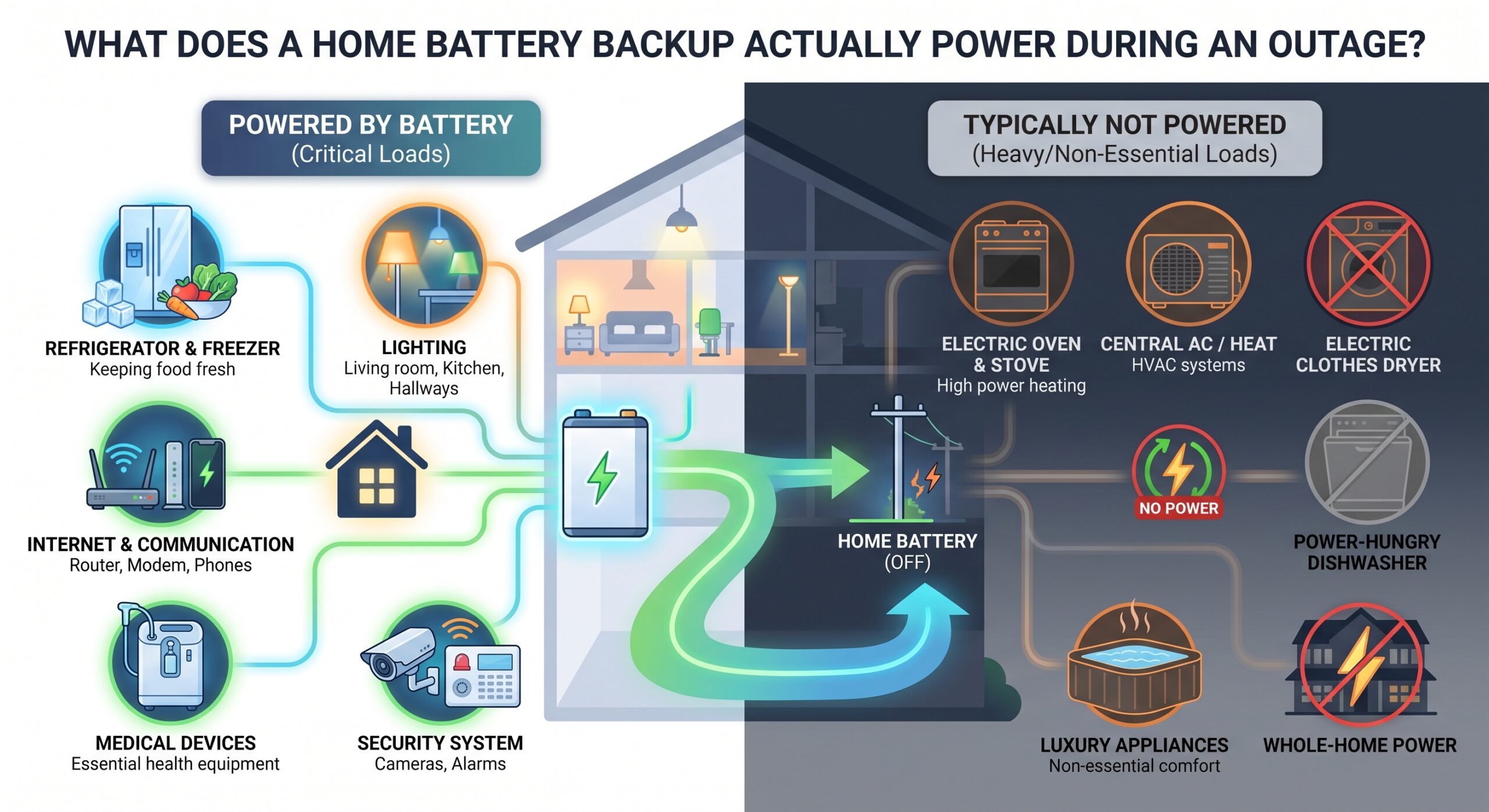
When the electricity goes out, a home battery can keep important appliances and devices running—but a battery backup does not automatically mean your entire house can operate normally for days.
What your battery can power depends on several factors: the battery’s usable capacity, its continuous power rating, the appliances connected to the backup system, how much electricity those appliances consume, and how long the outage lasts.
A small battery system might comfortably keep your refrigerator, Wi-Fi router, lights, phones, laptops, and a few other essentials operating. A larger whole-home system may also support air conditioning, electric water heaters, cooking appliances, well pumps, EV charging, and other high-power equipment.
The important distinction is that “can power” and “can power for a long time” are not the same thing.
This guide explains exactly what home battery backup systems can run during an outage, what they may struggle with, how to calculate your requirements, and how to decide which appliances should receive backup power.
Quick Answer: What Can a Home Battery Power?
A properly designed home battery backup system can potentially power:
- Refrigerator and freezer
- LED lights
- Wi-Fi router and modem
- Phones and chargers
- Laptops and computers
- Televisions
- Internet equipment
- Small kitchen appliances
- Microwave
- Medical equipment
- Sump pumps
- Security systems
- Garage doors
- Washing machines
- Dishwashers
- Air conditioners
- Electric heating
- Electric ranges and ovens
- Water heaters
- Well pumps
- EV chargers
However, not every battery can run all of these at the same time.
Tesla, for example, describes both partial-home and whole-home backup configurations. Partial systems can prioritize essential circuits such as lights and outlets while leaving high-energy appliances disconnected from backup power. Whole-home systems can be designed to support substantially larger loads.
The actual answer for your house comes down to power, energy capacity, and electrical system design.
1. A Home Battery Doesn’t Necessarily Power Every Outlet
One of the biggest misconceptions about home battery backup is assuming that installing a battery automatically makes every electrical circuit in the house available during an outage.
That’s not necessarily how the system is configured.
There are generally two approaches:
Partial-home backup
A battery supplies selected circuits or loads.
For example, your backup circuits might include:
- Refrigerator
- Kitchen lights
- Bedroom lights
- Wi-Fi
- Selected outlets
- Security system
- Medical equipment
Meanwhile, high-demand appliances such as central air conditioning, electric dryers, electric ranges, or EV chargers may remain outside the backed-up circuits.
This approach allows the battery to concentrate its limited stored energy on essential loads.
Whole-home backup
A properly sized system can provide backup to the home’s broader electrical system.
That can potentially include both ordinary 120-volt loads and larger 240-volt equipment. Tesla’s documentation, for example, lists air conditioners, electric cooking ranges, well pumps, EV charging, dryers, water heaters, and pool pumps among loads that can be supported in appropriate whole-home configurations.
But “whole-home” does not mean unlimited electricity.
If you run several large appliances simultaneously, the battery can discharge much faster.
2. The Three Numbers That Determine What Your Battery Can Run
Before deciding whether a battery can power your house, understand these three concepts:
Power: kW
Kilowatts (kW) describe how much power the battery can deliver at one moment.
Think of this as the size of the pipe.
A battery with a higher power rating can handle larger electrical loads simultaneously.
For example, an appliance requiring 4 kW represents a much larger instantaneous demand than one requiring 100 watts.
Energy: kWh
Kilowatt-hours (kWh) describe how much energy the battery stores.
Think of this as the size of the tank.
A larger kWh capacity generally means the battery can keep appliances running for longer.
For example, a battery with 10 kWh of usable energy has roughly twice the stored energy of a 5 kWh battery.
But actual runtime depends on how much electricity your home is consuming.
Surge or startup power
Some appliances briefly require significantly more power when their motors start.
This can matter for:
- Refrigerators
- Freezers
- Sump pumps
- Well pumps
- Air conditioners
- Heat pumps
So a system needs to be evaluated not only for normal operating consumption but also for the electrical demands associated with starting certain equipment.
3. What a Small Home Battery Can Usually Handle
For many homeowners, the most practical backup strategy is to protect essential loads rather than every appliance.
A battery in this category might be used for:
Refrigerator
Keeping the refrigerator operating is one of the most common backup priorities.
You don’t necessarily need to power the refrigerator continuously at its maximum rated wattage because compressors cycle on and off.
During an outage, however, the refrigerator’s startup demand and actual energy consumption still need to be considered when sizing the system.
Lights
LED lighting is relatively modest compared with major heating and cooling equipment.
A battery can therefore keep essential rooms illuminated without consuming enormous amounts of stored energy.
Wi-Fi router and modem
Internet equipment typically uses much less electricity than major household appliances.
Keeping your router online can be particularly useful during an extended outage because it can preserve communication and access to emergency information—assuming the internet service itself remains available.
Phones and laptops
Charging phones, tablets and laptops generally represents a relatively small portion of household energy consumption.
This makes electronics an obvious priority for limited battery capacity.
Television
A television can generally be included in an essential-load backup strategy, although watching it for many hours will consume more stored energy than simply keeping communication equipment running.
Security equipment
Security cameras, alarms, networking equipment and smart-home devices can often be included if they are connected to backed-up circuits.
4. What About a Refrigerator?
A refrigerator is one of the most logical appliances to include in a home battery backup system.
It is also a good example of why simply looking at the appliance’s rated wattage isn’t enough.
A refrigerator cycles.
The compressor isn’t necessarily drawing its maximum power continuously. Instead, it turns on and off according to cooling requirements.
The battery therefore needs enough:
- Instantaneous power to handle the compressor and startup requirements.
- Stored energy to operate the refrigerator throughout the outage.
A refrigerator can therefore be relatively easy to support compared with a central air conditioner or electric water heater.
For an extended outage, however, energy management becomes important. If you also operate heating, cooling, cooking appliances and other large loads, the battery will drain much faster.
5. Can a Home Battery Run Wi-Fi During an Outage?
Yes, provided the networking equipment is connected to a backed-up circuit and your internet provider’s infrastructure is still functioning.
Wi-Fi equipment itself generally uses relatively little electricity compared with appliances such as:
- Air conditioners
- Electric ovens
- Clothes dryers
- Electric water heaters
This makes internet equipment a common candidate for essential-load backup.
A battery can potentially keep your:
- Modem
- Router
- Mesh Wi-Fi system
- Network switch
- Security hub
operating during an outage.
But remember that your home’s battery cannot restore an internet connection if your ISP’s local network has also lost power.
6. Can a Battery Run an Air Conditioner?
Potentially—but air conditioning is one of the biggest challenges for home battery systems.
Central air conditioners can require substantial electrical power, especially during startup.
This creates two separate problems.
Problem 1: Instantaneous power
The battery inverter needs to be capable of handling the air conditioner’s electrical demand.
Problem 2: Energy consumption
Even if the battery can start the air conditioner, running it for hours can consume a large amount of stored energy.
This is why air conditioning often changes the size of the battery system needed for whole-home backup.
Tesla specifically recommends reducing the use of energy-intensive loads such as air conditioners during outages when trying to extend battery runtime.
A smaller battery might therefore support:
Refrigerator + lights + Wi-Fi + electronics
for a considerably longer period than:
Refrigerator + lights + Wi-Fi + central AC
7. What About Electric Heating?
Electric heating can be another major battery drain.
Resistance electric heaters can consume substantial power because they convert electricity directly into heat.
Heat pumps can also create significant demand, although their electricity consumption and operating characteristics differ from resistance heating.
If your home’s heating system is electric, you should specifically discuss its electrical requirements with a battery installer before assuming that a relatively small battery will keep the house warm throughout a long outage.
8. Can a Battery Power a Microwave?
Usually, a suitably sized system can power a microwave.
But there’s an important distinction between short-duration high-power appliances and appliances that consume energy continuously.
A microwave might draw substantial power while operating, but you may only use it for a few minutes.
Compare that with an electric heater that could operate for several hours.
The microwave therefore may have a high instantaneous demand without necessarily consuming enormous amounts of total stored energy over the course of an outage.
This illustrates why both kW and kWh matter.
9. Can a Battery Run a Washing Machine?
It depends on the system.
Washing machines contain motors and can have significant electrical demands during portions of their cycles. A properly sized whole-home system may support them.
However, washing machines are often excluded from smaller essential-load backup systems.
Tesla specifically gives washing machines as an example of a heavier load that may be left outside partial-home backup configurations.
During an extended outage, it may also make sense to prioritize refrigeration, lighting, communications and medical equipment rather than laundry.
10. What About a Dishwasher?
A dishwasher can potentially operate from battery backup, but it isn’t usually a first-priority outage load.
Dishwashers can use electricity for:
- Pumps
- Motors
- Controls
- Heating water
- Drying
The heating portion can substantially increase electricity consumption.
That’s why a battery system that can easily support lights and a refrigerator may not be sized to run the dishwasher repeatedly.
For a short outage, this might not matter.
For a 24- or 48-hour outage, energy conservation becomes much more important.
11. Can a Battery Run an Electric Oven or Stove?
A sufficiently powerful whole-home system may be able to support electric cooking equipment.
But electric ovens and ranges can be heavy electrical loads.
Tesla lists electric cooking ranges among 240-volt loads that can be supported in appropriate whole-home configurations.
The key word is appropriate.
A small battery designed around essential circuits should not be assumed to support a large electric range.
If cooking during outages is important to you, tell your installer exactly what type of cooking equipment you have.
12. Can a Battery Run an Electric Water Heater?
Yes, potentially.
But electric water heaters can consume substantial amounts of electricity when heating.
During an outage, homeowners who want maximum battery runtime may choose to avoid unnecessary water-heating cycles.
If hot water is an important backup requirement, the water heater should be included in the battery-sizing calculation.
Otherwise, you could end up with a system that technically supports the heater but runs out of stored energy much earlier than expected.
13. Can a Battery Run a Sump Pump?
A battery system can potentially support a sump pump, and this can be an important backup load for homes where flooding is a concern.
The challenge is that pumps have motors and may have higher startup demands.
You should therefore consider:
- Pump horsepower
- Startup current
- Operating wattage
- How frequently the pump runs
- Expected outage duration
A sump pump that runs occasionally can have a very different energy requirement from one that runs continuously during heavy rain.
14. What About a Well Pump?
Well pumps can be more demanding than many homeowners expect.
A well pump’s requirements depend on its:
- Motor size
- Pump type
- Depth
- Operating pressure
- Starting characteristics
A battery may be capable of supporting the pump, but the system needs sufficient power capacity and stored energy.
If your home depends on a private well, the well pump should be treated as a major consideration when designing your backup system.
15. Can a Battery Charge an Electric Vehicle During an Outage?
Some systems can support EV charging, but doing so can consume stored energy extremely quickly.
An EV charger is effectively another large electrical load.
For example, if a home battery is trying to preserve energy for:
- Refrigerator
- Lighting
- Communications
- Heating or cooling
adding EV charging can dramatically increase the rate at which the battery discharges.
Tesla’s current Powerwall documentation describes coordinated EV charging during outages in compatible configurations, where vehicle charging can slow or stop to prioritize the home’s loads.
For most homeowners facing a long outage, preserving battery capacity for essential household needs may require limiting EV charging.
16. What Appliances Usually Deserve Backup Priority?
If you’re designing an essential-load system, a useful priority order is:
Tier 1: Critical
- Medical equipment
- Refrigerator/freezer
- Essential lighting
- Security systems
- Internet/communications
- Phone charging
Tier 2: Important
- Sump pump
- Well pump
- Garage door
- Selected kitchen outlets
- Computer
- Television
- Small appliances
Tier 3: Comfort
- Air conditioning
- Heating
- Microwave
- Washing machine
- Dishwasher
- Entertainment systems
Tier 4: High-energy optional loads
- Electric dryer
- Electric oven
- Electric water heater
- EV charging
- Pool equipment
- Large resistance heaters
This isn’t a universal ranking—your household’s priorities may be completely different.
For example, a household dependent on a well pump may consider it a critical load, while a household in a mild climate may care more about refrigeration and communications.
17. The Difference Between “Can Run” and “Should Run”
This is perhaps the most important concept in home battery backup.
Suppose a battery is capable of running an air conditioner.
That doesn’t necessarily mean you should run the air conditioner continuously during a long outage.
Imagine two scenarios.
Scenario A: Essential loads
You operate:
- Refrigerator
- Wi-Fi
- LED lights
- Phones
- Laptop
Your total consumption may remain relatively modest.
Scenario B: Full comfort
You operate:
- Refrigerator
- Wi-Fi
- Lights
- Central AC
- Electric water heater
- Oven
- Dishwasher
- Dryer
- EV charger
The battery could discharge dramatically faster.
That’s why battery manufacturers and energy-storage experts emphasize load management during outages. Tesla specifically recommends reducing energy-intensive appliances to extend backup duration.
18. How Long Will a Home Battery Last?
There is no single answer.
Runtime depends on:
Battery capacity ÷ average load = approximate runtime
For example, suppose a battery has 10 kWh of usable energy and your backed-up loads average 500 watts.
500 watts = 0.5 kW.
10 kWh ÷ 0.5 kW = approximately 20 hours under simplified assumptions.
But real-world runtime can differ because of:
- Inverter losses
- Battery reserve settings
- Temperature
- Appliance cycling
- Startup loads
- Battery management
- Solar production
- Changes in household demand
So the calculation should be treated as an estimate rather than a guarantee.
19. Why Battery Capacity Alone Doesn’t Tell the Whole Story
Consider two batteries:
Battery A
- 15 kWh capacity
- Lower power output
Battery B
- 10 kWh capacity
- Higher power output
Battery A stores more energy, but Battery B could potentially handle a larger instantaneous load.
This is why homeowners shouldn’t compare systems based solely on the kWh number.
Look at:
- Usable kWh
- Continuous kW
- Peak/surge capability
- Number of battery units
- Inverter capacity
- Supported voltage
- Backup circuit configuration
- Solar recharge capability
20. What Is a Critical Loads Panel?
A critical loads panel is an electrical panel used to separate selected circuits from the rest of the home.
Instead of backing up everything, the system can prioritize circuits such as:
- Refrigerator
- Lights
- Internet
- Security
- Medical equipment
- Selected outlets
This can make it easier to manage a smaller battery system.
Tesla’s documentation describes partial-home configurations where backed-up loads are separated from non-backed-up loads through the system design.
The exact equipment and configuration vary by battery system, electrical service and local requirements.
Electrical work should be performed by a qualified professional.
21. What Happens When the Grid Goes Down?
A properly installed home battery system is designed to detect the outage and disconnect the home from the utility grid.
The battery then supplies power to the backed-up loads.
The purpose of this isolation is important: your home battery should not simply send electricity backward onto utility lines while utility workers are repairing the grid.
The U.S. Department of Energy describes solar-plus-storage resilience systems that detect grid loss and switch into an islanded operating mode to continue powering critical loads.
Modern systems can perform this transition automatically.
For example, Tesla says its Powerwall can disconnect from the grid and restore backup power in a fraction of a second.
22. What Happens If the Battery Runs Low?
Once stored energy gets low, the system must prioritize what remains.
Depending on the equipment and configuration, you may be able to:
- Reduce appliance usage
- Increase the battery reserve
- Turn off large loads
- Use solar production to recharge
- Delay nonessential appliances
- Monitor remaining battery percentage
Some systems also provide apps showing current power consumption and remaining energy.
This can help you identify which appliances are consuming the most electricity.
23. Can Solar Panels Recharge the Battery During an Outage?
A properly designed solar-plus-storage system can potentially use solar generation to recharge the battery while the grid is unavailable.
This is one of the major advantages of combining solar with battery storage.
The battery isn’t necessarily limited to the energy stored before the outage.
However, solar production varies throughout the day.
Factors include:
- Weather
- Time of day
- Season
- Panel orientation
- Shading
- Solar system size
- Battery configuration
DOE notes that solar combined with battery storage can provide critical building loads during grid outages and improve resilience.
So solar can extend backup duration, but it shouldn’t automatically be treated as an unlimited energy source.
24. How to Calculate What Your Home Actually Needs
Before buying a battery, make a list of the appliances you want to operate.
Create four columns:
| Appliance | Approx. Power | Hours/Day | Priority |
|---|---|---|---|
| Refrigerator | Check label | 24 | Critical |
| Wi-Fi | Check adapter | 24 | High |
| LED lights | Check bulbs | 4–8 | High |
| TV | Check label | 3 | Medium |
| Microwave | Check label | 0.5 | Medium |
| AC | Check nameplate | Variable | Comfort |
| Water heater | Check nameplate | Variable | Comfort |
| EV charger | Check charger | Variable | Optional |
Then calculate approximate energy consumption.
Example
If a device averages 100 watts and operates for 10 hours:
100 W × 10 hours = 1,000 Wh
1,000 Wh = 1 kWh
Do this for each appliance.
Then add the results.
This gives you a starting estimate of your daily energy requirement.
25. Don’t Forget Startup Loads
One of the most common mistakes in backup sizing is adding up normal operating wattage and stopping there.
Motor-driven appliances may require additional power when starting.
This includes:
- Refrigerators
- Freezers
- Pumps
- Air conditioners
- Some fans
- Certain compressors
Your installer should consider both the normal running load and starting requirements.
A battery with enough kWh capacity isn’t necessarily suitable if its inverter can’t handle the instantaneous electrical demand.
26. Essential Backup vs Whole-Home Backup
Here’s the basic difference:
| Feature | Essential-Load Backup | Whole-Home Backup |
|---|---|---|
| Refrigerator | Usually prioritized | Yes, if system is properly sized |
| Lights | Yes | Yes |
| Wi-Fi | Usually | Yes |
| Small electronics | Usually | Yes |
| AC | May be excluded | Potentially |
| Electric oven | Often excluded | Potentially |
| Electric dryer | Often excluded | Potentially |
| EV charging | Often excluded | Potentially |
| Large pumps | Depends | Potentially |
| Battery size | Usually smaller | Usually larger |
| Outage strategy | Energy conservation | Higher level of normal operation |
The important point is that whole-home backup isn’t simply “one battery powers everything.”
The system must be engineered around your home’s electrical loads.
Tesla, for example, says the number of Powerwalls and the home’s energy usage affect how much can be backed up and for how long.
27. What Does a Typical Essential Backup Setup Look Like?
A practical essential-load setup might prioritize:
Refrigerator → Wi-Fi → Lights → Phones → Security → Computer → Selected outlets
During a short outage, you might also operate:
Microwave → TV → Coffee maker
During a longer outage, you’d probably become more selective.
For example:
- Don’t run the microwave unnecessarily.
- Limit TV use.
- Avoid electric heating unless necessary.
- Delay laundry.
- Avoid running the dryer.
- Limit EV charging.
- Keep the refrigerator closed as much as possible.
The goal is to reduce average consumption and stretch stored energy.
28. What About Medical Equipment?
Medical equipment can make battery backup much more important.
Depending on the equipment, a battery may be able to provide backup for devices such as CPAP machines or other electrically powered medical equipment.
EnergySage identifies medical equipment among the types of essential loads that can be supported by appropriately sized battery systems.
If a medical device is essential to someone’s health or safety, don’t rely solely on a generic runtime estimate.
Ask the equipment manufacturer and a qualified backup-power professional about:
- Required wattage
- Startup requirements
- Runtime
- Battery compatibility
- Redundancy
- Emergency backup procedures
29. What About a Garage Door?
A garage door opener is generally a relatively short-duration load.
If the garage circuit is connected to backup power, the battery may be able to operate it.
But remember that the ability to run one short cycle doesn’t mean the entire garage electrical circuit should necessarily be backed up.
Electrical system configuration matters.
30. What About Pool Pumps?
Pool pumps can consume substantial electricity because they may run for several hours per day.
A whole-home battery system may support a pool pump, but keeping it running continuously can significantly reduce backup duration.
During a long outage, homeowners may choose to prioritize more critical loads.
Again, the battery’s job isn’t simply to determine whether an appliance is “compatible.”
It must supply enough power and energy for the way you intend to use it.
31. Why Your Outage Duration Changes Everything
A battery designed for a four-hour outage doesn’t necessarily need to provide the same experience as one designed for a 48-hour outage.
Short outage
You may be able to maintain relatively normal household behavior.
12–24-hour outage
Energy management becomes more important.
Multi-day outage
You may need to prioritize only essential loads and rely on solar generation, if available, to recharge the battery.
The longer the outage, the more important your daily energy consumption becomes.
DOE’s REopt tools specifically evaluate how battery storage can sustain critical loads during grid outages, illustrating why load profiles and outage duration are central to system sizing.
32. A Simple Example: 10 kWh Battery
Imagine a home has a battery with approximately 10 kWh of usable energy.
The homeowner chooses to back up:
- Refrigerator
- Wi-Fi
- 6 LED lights
- Phones
- Laptop
- Television
The average demand might remain relatively low, allowing the battery to last substantially longer than if the homeowner also ran:
- Central AC
- Electric oven
- Electric water heater
- Dryer
- EV charger
The battery hasn’t changed.
The load has.
That’s the central lesson of home battery backup.
33. What Is the Biggest Battery Backup Mistake?
The biggest mistake is asking:
“How many appliances can my battery run?”
A better question is:
“Which loads do I need, how much power do they require, and how long do I need them to operate?”
That changes the conversation from an appliance checklist into an actual energy plan.
A refrigerator for 24 hours is different from an electric dryer for one hour.
A 60-watt medical device running continuously is different from a 3,500-watt electric oven running for 30 minutes.
The battery has to accommodate both the power requirement and the energy requirement.
34. How to Choose What Your Battery Should Power
Ask yourself these questions:
Question 1: What cannot go without electricity?
Examples:
- Medical devices
- Refrigeration
- Heating/cooling
- Water supply
- Communications
Question 2: How long are your typical outages?
If outages normally last one or two hours, your requirements may be very different from someone preparing for multi-day outages.
Question 3: Do you have electric heating?
If yes, include it in your calculation.
Question 4: Do you have a well?
If yes, account for the pump.
Question 5: Do you have central AC?
If yes, check its electrical requirements carefully.
Question 6: Do you want to charge an EV?
If yes, treat EV charging as a major additional load.
Question 7: Do you have solar?
Solar can potentially recharge your battery during daylight hours during an outage if the system is designed to operate that way.
35. Battery Backup Doesn’t Mean Unlimited Electricity
This is worth repeating.
A battery is an energy-storage device, not a miniature utility company.
Even a large battery has finite stored energy.
If you use electricity faster than the battery can be recharged, the stored energy will eventually run out.
For this reason, battery backup systems work best when homeowners understand their energy budget.
During an outage, ask:
What needs to run?
What can wait?
What uses the most electricity?
Can solar recharge the battery?
How long might the outage last?
Those questions are much more useful than simply counting appliances.
Frequently Asked Questions
Can one home battery power an entire house?
It can, depending on the battery’s power and energy ratings and the home’s electrical loads. Whole-home backup requires appropriate system sizing and electrical configuration. Some systems instead back up only selected essential circuits.
Can a home battery run a refrigerator during a blackout?
Yes, a suitably sized system can generally support a refrigerator. The system needs enough power for the refrigerator’s operating and startup requirements and enough stored energy for the desired outage duration.
Can a battery run central AC?
Potentially. However, air conditioning can be a major electrical load, so the battery inverter and total energy capacity must be sized appropriately.
Can I run my TV and Wi-Fi from a battery?
Yes, if those circuits are backed up and the system has sufficient capacity.
Can a battery run an electric stove?
A sufficiently sized whole-home system may be able to. Smaller essential-load systems may exclude electric cooking equipment.
Can I run a washing machine during an outage?
Potentially, but it depends on the system configuration and battery capacity. Washing machines are often not prioritized in smaller essential-load systems.
How many hours will a battery last?
There is no universal number. Runtime depends on battery capacity, household consumption, inverter losses, battery reserve settings, appliance cycling and whether solar is available for recharging.
Does a bigger battery always mean more appliances?
Not necessarily. A battery’s kWh capacity determines stored energy, while its kW power rating determines how much power it can deliver at once. Both matter.
Can solar panels keep my battery running during an outage?
A properly designed solar-plus-storage system can potentially recharge the battery during an outage. Solar output varies with weather, season, time of day and system configuration.
What should I prioritize during a long outage?
Most households should first consider essential needs such as refrigeration, medical equipment, lighting, communication, security and water-related equipment. The exact priorities depend on the household.
Final Takeaway
So, what does battery backup actually power during a home outage?
The answer is: whatever your system has been designed and sized to support—but the amount of time it can run those loads depends on how much energy they consume.
A modest essential-load system can focus on:
Refrigerator + lights + Wi-Fi + phones + computers + security equipment
A larger whole-home system can potentially add:
Air conditioning + electric cooking + water heating + pumps + laundry + EV charging
But there is always a tradeoff between how much power you use and how long the stored energy lasts.
The smartest way to size a home battery is therefore not to ask, “Can this battery run my house?”
Instead, determine:
- Which appliances are essential?
- How many watts do they require?
- What startup power do they need?
- How many hours will they operate?
- How long might the outage last?
- Can solar recharge the battery?
- Which high-energy loads can you turn off during an outage?
That information gives you a much more realistic picture of what your battery backup system can actually do.