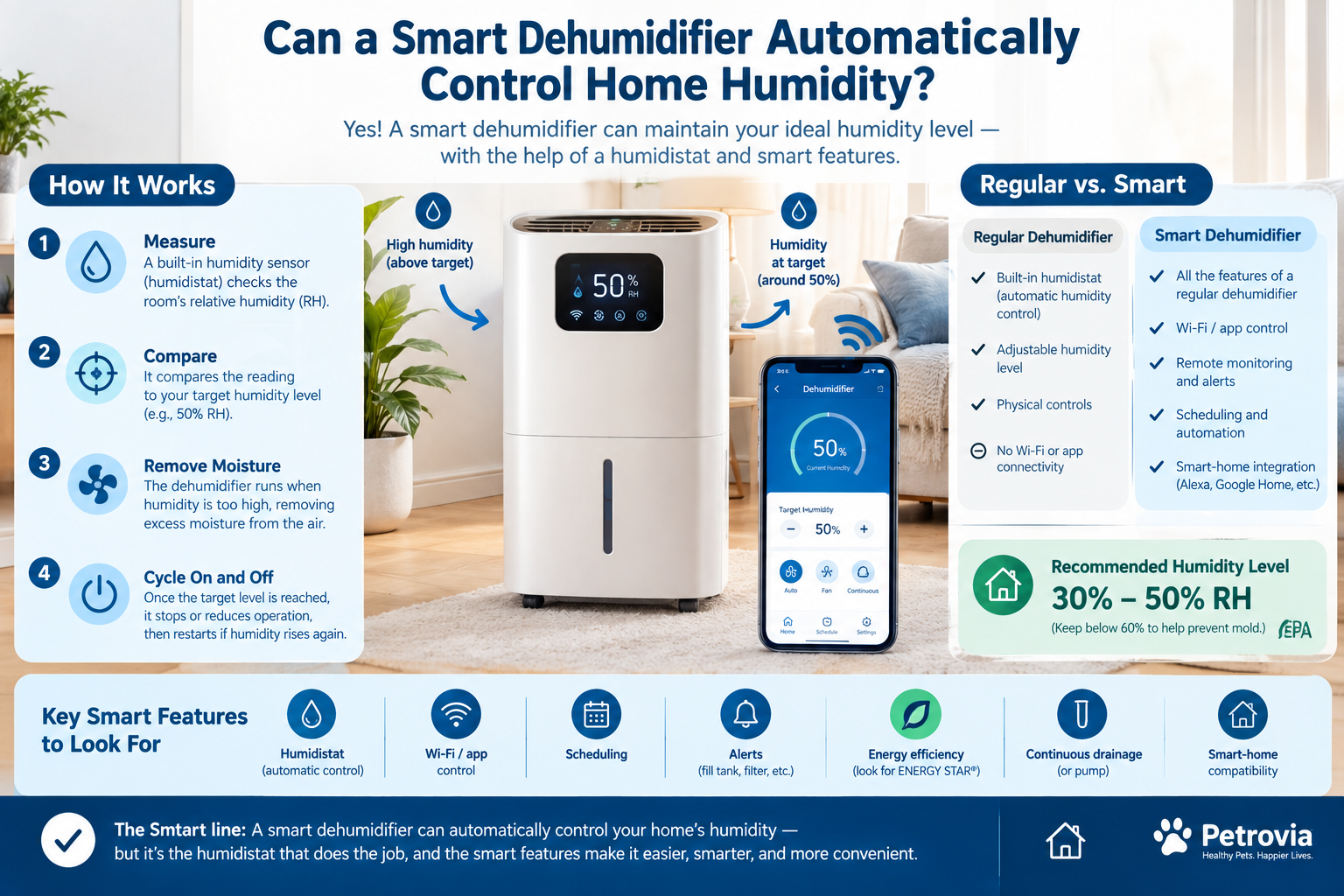
Can a Smart Dehumidifier Automatically Control Home Humidity?
Yes—a smart dehumidifier can automatically control your home’s humidity, but Wi-Fi is not the feature that actually makes this possible.
The key component is a built-in humidistat or humidity sensor. It measures the relative humidity (RH) in the room and allows the dehumidifier to operate toward a selected humidity level.
For example, if you set your dehumidifier to 50% relative humidity, the unit can monitor the room and run when humidity rises above its control range, then cycle down or shut off when the target level is reached.
Smart models add another layer of convenience. Depending on the model, you may be able to monitor humidity from your phone, change the target level remotely, create schedules, receive alerts, control the unit with Alexa or Google Home, or integrate it with other smart-home devices.
So the simple answer is:
A humidistat controls humidity. Wi-Fi makes that control smarter and more convenient.
For most homes, the goal isn’t to make the air as dry as possible. The EPA recommends keeping indoor relative humidity around 30% to 50%, while keeping it below 60% can help reduce conditions that encourage mold growth.
Let’s look at how smart dehumidifiers actually accomplish this and what you should know before buying one.
How Does a Smart Dehumidifier Automatically Control Humidity?
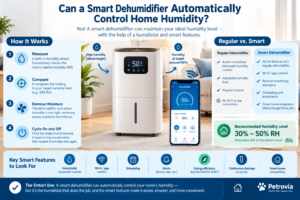
A smart dehumidifier typically follows a simple feedback loop:
Measure humidity → compare it with your target → remove moisture → recheck humidity → adjust operation
The process happens automatically.
Suppose your room is currently at 65% RH and you set the dehumidifier to 50%.
The unit measures the humidity and begins removing moisture from the air. As the humidity falls toward the target, the dehumidifier eventually reduces operation or switches off.
If moisture later enters the room from a shower, cooking, wet laundry, outdoor air infiltration, or another source, the humidity rises again. The dehumidifier detects the change and can restart.
This is fundamentally the same principle used by conventional dehumidifiers with automatic humidity control.
GE, for example, describes its automatic humidistat as a control that starts the dehumidifier when humidity is high and shuts it off when humidity is low.
Smart models simply add connectivity and additional controls on top of this basic system.
What Is a Humidistat?
A humidistat is essentially a humidity-control device.
Think of it as the humidity equivalent of a thermostat.
A thermostat measures temperature and controls heating or cooling based on a temperature setting.
A humidistat measures relative humidity and controls a dehumidifier based on a humidity setting.
For example:
| Setting | What the device tries to maintain |
|---|---|
| 40% RH | Relatively dry indoor environment |
| 45% RH | Dry, comfortable environment |
| 50% RH | Common general-purpose target |
| 55% RH | Less aggressive moisture removal |
| 60% RH | Higher humidity; generally not ideal as a long-term target |
ENERGY STAR notes that certified dehumidifiers include a built-in humidistat that allows users to set a desired relative humidity. Once that level is reached, the appliance cycles on and off to maintain it.
That means you do not necessarily need a smart dehumidifier to get automatic humidity control.
A basic dehumidifier with a good humidistat can already do this.
What Makes a Dehumidifier “Smart”?
The word smart generally refers to connectivity and additional automation rather than the basic ability to regulate humidity.
A smart dehumidifier may provide:
- Wi-Fi connectivity
- Smartphone app control
- Remote humidity monitoring
- Remote power control
- Humidity setpoint adjustment
- Custom schedules
- Notifications
- Filter reminders
- Full-water-tank alerts
- Fan-speed control
- Smart-home integration
- Voice control
- Automated routines
For example, current Frigidaire Wi-Fi dehumidifier models offer app-based humidity management, remote on/off control, custom schedules, and fan-speed adjustment. Some models also support Alexa and Google Home.
GE’s connected models similarly combine Wi-Fi monitoring and control with Smart Dry technology that automatically adjusts fan operation based on room humidity.
Midea also offers smart dehumidifiers with automatic humidity control and app-based remote control. One current model, for example, advertises automatic humidity management in a 45%–55% range based on room temperature.
So when shopping, don’t assume:
Wi-Fi = automatic humidity control.
Instead, look specifically for:
Humidistat + adjustable humidity setpoint + Auto/Smart/Comfort mode.
Smart Dehumidifier vs. Regular Dehumidifier
The biggest difference is usually convenience rather than the fundamental moisture-removal process.
| Feature | Regular dehumidifier | Smart dehumidifier |
|---|---|---|
| Removes moisture | Yes | Yes |
| Built-in humidity sensor | Often | Usually |
| Automatic humidity control | Many models | Usually |
| Adjustable RH target | Many models | Usually |
| Physical controls | Yes | Yes |
| Wi-Fi/app | No | Yes |
| Remote monitoring | No | Yes |
| Remote control | No | Yes |
| Scheduling | Some models | Common |
| Smart-home integration | Rare | Often |
| Phone notifications | Rare | Often |
| Voice control | Rare | Often |
The important point is that automatic humidity control isn’t exclusive to smart products.
If all you want is for the appliance to maintain approximately 50% RH without manually switching it on and off, a standard dehumidifier with a reliable humidistat may be enough.
If you want to check humidity while you’re away, receive alerts, create schedules, or connect the appliance to a broader smart-home system, a smart model becomes more useful.
What Humidity Should You Set on a Smart Dehumidifier?
For most homes, around 40% to 50% RH is a practical target range.
The EPA recommends maintaining indoor humidity between 30% and 50%, while keeping it below 60% is recommended when possible to help control moisture and mold-related problems.
A setting around 45% or 50% is therefore a reasonable starting point for many households.
However, the ideal setting can depend on the room, climate, season, condensation problems, and personal comfort.
A practical starting point
Try:
45%–50% RH
Then observe the room.
If you continue seeing condensation or the room remains noticeably damp, you may need to investigate the moisture source and potentially lower the setting.
If the air becomes excessively dry or uncomfortable, you may want to increase the target.
Don’t automatically choose the lowest possible humidity setting.
The goal is moisture control, not making your home extremely dry.
Does a Smart Dehumidifier Run All the Time?
Normally, no—not when automatic humidity control is functioning properly.
Suppose you set the target to 50%.
The room starts at 65%.
The dehumidifier may run for an extended period because it has a significant amount of moisture to remove.
Once the humidity reaches the appropriate control range, the compressor may shut off or the appliance may change how it operates.
Later, humidity may rise again.
The unit can then restart.
This creates a cycle:
High humidity → dehumidifier runs → humidity falls → unit cycles down/off → humidity rises → unit runs again
GE explains that an automatic humidistat can cycle the appliance based on the selected humidity level. However, during particularly humid conditions, a unit may run for long periods because moisture continuously enters the space.
So continuous operation doesn’t automatically mean something is wrong.
Why Does My Dehumidifier Keep Running?
If your smart dehumidifier seems to run constantly, there are several possible explanations.
1. The room is extremely humid
If humidity starts at 70%, 80%, or higher, the unit may need significant time to bring the level down.
2. Moisture keeps entering the room
Common sources include:
- Showers
- Cooking
- Indoor clothes drying
- Basement moisture
- Plumbing leaks
- Poor ventilation
- Humid outdoor air
- Groundwater or foundation moisture
- Air leakage around doors and windows
The EPA specifically identifies cooking, showering, moisture-producing appliances, and other sources as contributors to indoor humidity.
3. The dehumidifier is undersized
A small portable unit may struggle in a large or very damp space.
4. The drainage system is limiting operation
If the water bucket fills quickly and the unit shuts down, it may appear that the appliance is not keeping up.
5. The filter needs cleaning
Restricted airflow can reduce performance.
6. The humidity sensor isn’t seeing representative room air
Placement can affect what the sensor detects.
7. You’re using Continuous mode
Some models have a continuous setting that deliberately ignores normal humidity cycling and runs continuously.
Midea, for example, notes that Continuous mode runs the unit constantly, while Comfort mode can automatically set humidity to 50% on applicable models.
What Is the Difference Between Auto, Smart, Comfort, and Continuous Mode?
This is one of the most confusing parts of shopping for a smart dehumidifier.
Manufacturers don’t necessarily use identical names for identical features.
Auto mode
Usually means the appliance automatically adjusts operation according to the humidity level or selected target.
Smart mode
Often refers to automated humidity management, sometimes using humidity and temperature information.
For example, Midea uses Smart Dehumidification to automatically control room humidity within a specified range based on room temperature on certain models.
Comfort mode
Usually provides an automatic target intended to maintain a comfortable humidity level.
Some Midea models, for example, automatically use a 50% humidity target in Comfort mode.
Continuous mode
This is different.
Continuous operation generally means the unit keeps running rather than cycling normally around a humidity target.
This can be useful when:
- A room has severe moisture problems
- You’re initially drying a very damp space
- You’re drying laundry
- You’re dealing with a recent water event
But it isn’t normally the best everyday setting if your goal is efficient automatic humidity maintenance.
Always check the individual model’s manual because manufacturers use these labels differently.
Can a Smart Dehumidifier Turn Itself On When Humidity Rises?
Yes, if the model’s automatic humidity-control system supports cycling around a setpoint.
This is one of the main benefits of a built-in humidistat.
For example, you might select:
Target humidity: 50%
The unit monitors humidity.
If humidity is sufficiently above the target, it operates.
Once the room reaches its control range, it stops or reduces operation.
If humidity rises later, it can start again.
The exact restart threshold isn’t necessarily identical to your displayed target.
Manufacturers can use a control differential, sometimes called a deadband or hysteresis, to prevent the compressor from rapidly switching on and off.
This is important because you don’t want a compressor constantly cycling every time humidity moves by a fraction of a percentage point.
Can You Control a Smart Dehumidifier From Your Phone?
Yes, many Wi-Fi-enabled models allow this.
Depending on the appliance, the app may let you:
- Turn the unit on or off
- View current humidity
- Change the humidity target
- Select operating modes
- Change fan speed
- Create schedules
- Receive alerts
- Monitor the appliance while away
Frigidaire’s current connected dehumidifiers, for example, advertise remote humidity management, schedules, fan-speed control, and remote power control through the Frigidaire app.
That can be particularly useful if you have:
- A basement
- A vacation property
- A laundry room
- A storage room
- A damp bedroom
- A garage
- A home in a humid climate
Instead of wondering whether the room is becoming excessively humid while you’re away, you can check the app.
Can a Smart Dehumidifier Work With Alexa or Google Home?
Some can.
Certain connected models allow basic voice commands such as turning the appliance on or off or changing the humidity setting.
Frigidaire documents Alexa commands that can adjust a connected dehumidifier’s humidity setting.
However, don’t assume every Wi-Fi dehumidifier supports every smart-home platform.
Before buying, check for compatibility with the ecosystem you actually use.
Look for:
- Alexa
- Google Home
- Apple Home
- Matter
- Manufacturer-specific apps
- IFTTT or other automation platforms, where supported
The word “smart” alone doesn’t guarantee broad smart-home compatibility.
Can a Smart Dehumidifier Automatically Prevent Mold?
It can help control one of the conditions that encourages mold, but it cannot guarantee that mold will never develop.
Moisture control is an important part of mold prevention.
The EPA recommends keeping indoor relative humidity below 60%, ideally between 30% and 50%, and addressing water leaks and damp materials promptly.
A smart dehumidifier can help by maintaining a lower humidity level automatically.
But it cannot fix:
- A leaking pipe
- Roof leaks
- Foundation water intrusion
- Poor drainage
- Wet building materials
- A serious ventilation problem
- Existing mold contamination
Think of the dehumidifier as a moisture-control tool, not a complete mold-remediation system.
If water continues entering the building, the underlying source needs to be addressed.
Does a Smart Dehumidifier Save Electricity?
It can help avoid unnecessary operation, but being smart does not automatically mean it uses less electricity.
A good humidity-control system prevents the appliance from running longer than necessary.
ENERGY STAR states that certified dehumidifiers use more efficient refrigeration coils, compressors, and fans and can use about 20% less energy than comparable conventional models under its program criteria.
Energy consumption depends on factors such as:
- Dehumidifier efficiency
- Room humidity
- Temperature
- Target humidity
- Room size
- Moisture entering the home
- Operating time
- Drainage setup
- Maintenance
- Appliance capacity
The most useful combination is therefore:
Efficient dehumidifier + correct sizing + sensible humidity target + automatic cycling + moisture-source control
Why Continuous Drainage Matters for Automatic Humidity Control
A smart dehumidifier may be able to control humidity automatically, but that doesn’t mean you can completely ignore it.
The water collected from the air has to go somewhere.
With a traditional bucket:
Humidity rises → dehumidifier runs → tank fills → unit shuts down → you empty the tank
That last step can interrupt automatic operation.
If the unit supports continuous drainage, you can connect it to an appropriate drain so water can leave automatically.
Some models also include pumps that allow collected water to be moved upward to a suitable drain location. Frigidaire offers models with continuous drainage and built-in pump options.
For a basement or very humid room, continuous drainage can be especially valuable.
If your goal is truly hands-off humidity control, drainage deserves almost as much attention as Wi-Fi.
Can You Use a Smart Plug to Automate a Regular Dehumidifier?
Technically, a smart plug can provide basic remote power control for some appliances, but it is not the same thing as proper humidity control.
A smart plug can essentially provide:
Power on / power off
It does not automatically know the room’s humidity unless another sensor and automation system are involved.
A more complicated setup could theoretically use:
Humidity sensor → smart-home automation → smart plug → dehumidifier
But there are important limitations.
The dehumidifier must be compatible with this style of power control, including how it behaves when power is restored. Some appliances require a button press after a power interruption rather than automatically restarting.
Compressor-based appliances also shouldn’t be rapidly power-cycled.
For reliable humidity management, a purpose-built dehumidifier with a built-in humidistat and automatic control is generally the better solution.
What About Using an External Smart Humidity Sensor?
An external humidity sensor can be useful when the dehumidifier’s built-in sensor doesn’t represent the room accurately.
For example, imagine a basement with several rooms.
The dehumidifier is located in one room, but another room is consistently more humid.
The built-in sensor measures humidity near the appliance.
A separate sensor can tell you what is happening elsewhere.
This can be useful in a broader smart-home system, but compatibility matters.
Ideally, the automation system should be able to:
- Read the external humidity sensor.
- Determine whether humidity is above the desired threshold.
- Communicate with the dehumidifier.
- Avoid rapid cycling.
- Handle minimum run/off periods appropriately.
- Alert you if the dehumidifier cannot keep up.
For a single room, however, the built-in humidistat is usually much simpler.
Where Should You Put a Smart Dehumidifier?
Placement can make a major difference.
A portable dehumidifier should generally have enough clearance around its air intake and outlet and should be positioned according to the manufacturer’s instructions.
Avoid placing it where airflow is severely restricted.
Also consider where the humidity problem actually occurs.
For example:
- Basement: place it where it can circulate air throughout the area.
- Bedroom: position it so the airflow isn’t blocked by furniture.
- Bathroom: use appropriate ventilation and follow electrical-safety requirements rather than simply placing an appliance in a wet location.
- Laundry room: position it where it can help address moisture while ensuring adequate airflow.
Remember that one portable unit doesn’t automatically control the humidity in every room of a large house.
An open floor plan is easier to influence than a home divided by multiple closed doors and floors.
Can One Smart Dehumidifier Control the Whole House?
Usually, not effectively if it is simply a portable room unit.
Portable dehumidifiers are generally designed to treat a particular space.
ENERGY STAR distinguishes portable room dehumidifiers from whole-home dehumidifiers. Whole-home systems are installed with ductwork so they can dehumidify air across multiple areas of the home.
A whole-home system may make more sense when:
- Multiple rooms consistently have high humidity
- The house has central HVAC
- Humidity remains high throughout the building
- You want centralized control
- A portable unit would need to be moved around constantly
For one damp basement or bedroom, a portable smart model may be more practical.
For persistent whole-house humidity problems, investigate the building and HVAC system rather than assuming a portable appliance is the answer.
How to Choose a Smart Dehumidifier for Automatic Humidity Control
Don’t choose a model based on Wi-Fi alone.
Use this checklist instead.
1. Look for a built-in humidistat
This is the most important feature for automatic humidity control.
2. Check the adjustable humidity range
Make sure the unit supports the target you want.
3. Look for Auto or Smart mode
Confirm exactly what the mode does in the manufacturer’s documentation.
4. Check the actual room coverage
Don’t assume a larger number on the box automatically means better performance in every situation.
5. Consider energy efficiency
ENERGY STAR certification is a useful starting point when available in your market.
6. Look for continuous drainage
This can make automatic operation far more convenient.
7. Consider a built-in pump
A pump can be useful when gravity drainage isn’t practical.
8. Check Wi-Fi features
Look for:
- Live humidity readings
- Remote controls
- Scheduling
- Notifications
- Mode control
9. Check smart-home compatibility
Make sure it works with the platform you actually use.
10. Check operating temperature
If you’re using it in a basement, garage, or other cool space, verify the manufacturer’s minimum operating temperature.
11. Look for filter reminders
A dirty filter can interfere with performance and airflow.
12. Don’t overlook noise
A powerful dehumidifier can be noticeable in bedrooms and living spaces.
Smart Features That Are Actually Worth Paying For
Not every smart feature is equally useful.
High-value features
Automatic humidity control
This is essential if you want hands-off operation.
Accurate humidity display
Useful for understanding what is happening in the room.
Continuous drainage
Excellent for long unattended operation.
Remote alerts
Useful if the bucket fills or the device stops.
Scheduling
Helpful if humidity varies by time of day.
Remote monitoring
Especially useful for basements, vacation homes, and storage areas.
Nice-to-have features
Voice control
Convenient, but not essential.
Fancy app dashboards
Useful only if you actually use them.
Multiple operating modes
Helpful when the modes provide meaningful control.
Smart-home routines
Potentially powerful for advanced users, but not necessary for basic humidity management.
What a Smart Dehumidifier Cannot Do
Even an advanced smart model has limits.
It cannot:
- Repair a plumbing leak
- Stop groundwater intrusion
- Fix a poorly sealed building
- Replace bathroom exhaust ventilation
- Remove all mold
- Dry structurally wet materials by itself
- Control humidity in every closed room equally
- Guarantee a precise humidity level throughout an entire house
- Automatically diagnose every moisture problem
If the humidity repeatedly climbs back to 70% after the dehumidifier turns off, the solution may not be “buy a smarter dehumidifier.”
You may have a moisture-source problem.
Signs Your Home Has a Bigger Humidity Problem
A dehumidifier can be useful, but watch for persistent warning signs.
Condensation on windows
This can indicate excessive indoor moisture, especially when it occurs regularly.
Musty smells
A persistent musty odor can indicate moisture or microbial growth.
Visible mold
A dehumidifier may help control future moisture, but existing mold needs appropriate cleanup and the moisture source needs to be addressed.
Damp walls or floors
This can indicate water intrusion rather than simply high indoor humidity.
Humidity immediately rises after the dehumidifier stops
This can happen when there is a significant moisture source or very humid outdoor air entering the home.
The EPA recommends addressing leaks and other moisture problems promptly rather than relying only on humidity control.
Smart Dehumidifier Automation: A Practical Example
Imagine a bedroom normally sits around 58% RH overnight.
You install a smart dehumidifier and set it to 50%.
10:00 PM
Humidity: 58%
The dehumidifier operates.
11:30 PM
Humidity: 52%
The unit continues working toward the target.
12:30 AM
Humidity: approximately 50%
The compressor cycles off or changes operation according to the model’s control logic.
3:00 AM
Humidity rises to 54%
The unit detects the increase and resumes operation.
6:30 AM
Humidity returns to approximately 50%
The unit cycles down again.
You didn’t need to wake up and manually switch anything.
That’s the basic concept behind automatic humidity control.
The smart-home component simply allows you to add additional convenience around that process.
Does a Smart Dehumidifier Need Wi-Fi to Control Humidity?
No.
This is one of the most important points to understand.
A dehumidifier with a built-in humidistat can automatically control humidity without internet access.
The basic control loop happens inside the appliance:
Humidity sensor → control board → compressor/fan → humidity sensor
Wi-Fi is generally used for communication with the app or smart-home ecosystem.
Therefore, if your internet connection goes down, a properly designed dehumidifier can often continue performing its basic local humidity-control function.
The exact behavior depends on the model.
This is another reason to prioritize the appliance’s local controls and humidistat over flashy connected features.
Smart Dehumidifier vs. Smart Thermostat for Humidity
A smart thermostat can sometimes display or monitor indoor humidity, but that doesn’t necessarily mean it can directly control a portable dehumidifier.
Some HVAC systems have dedicated humidity-control capabilities.
Others don’t.
If your central air-conditioning system already provides effective dehumidification, a separate portable dehumidifier may not always be necessary.
However, a portable dehumidifier can be useful when:
- The basement is damp
- A particular room has high humidity
- The HVAC doesn’t circulate well into a space
- Humidity remains high even when the AC is running
- You need targeted moisture removal
ENERGY STAR notes that whole-home dehumidifiers can be appropriate in humid climates for homes with central air conditioning where humidity remains consistently elevated throughout the house.
Is 50% Humidity Always the Best Setting?
Not necessarily.
50% is a useful general starting point, not a universal rule.
The EPA’s general guidance is to keep indoor relative humidity around 30%–50% and below 60% when possible.
Your home’s construction, climate, outdoor conditions, condensation risk, and personal comfort all matter.
For example, a home with persistent window condensation may require a different approach than a relatively dry home.
The most important thing is to avoid thinking:
Lower humidity is always better.
Extremely dry indoor air can also cause discomfort.
The objective is a reasonable, stable humidity range, not the lowest number your machine can achieve.
How to Make Automatic Humidity Control Work Better
A smart dehumidifier works best when you also reduce the amount of moisture entering the home.
Use bathroom exhaust fans
Run them during and after showers as appropriate.
Vent cooking moisture
Kitchen exhaust should discharge outdoors where possible.
Vent clothes dryers outdoors
This prevents dryer moisture from accumulating indoors.
Fix plumbing leaks
A dehumidifier should not be used as a substitute for repairing a water leak.
Address basement moisture
Check drainage, foundations, gutters, and other possible sources.
Improve air circulation
Humidity can vary significantly between rooms.
Keep the filter clean
Follow the manufacturer’s maintenance schedule.
Use continuous drainage when appropriate
This prevents a full water bucket from interrupting automatic operation.
The EPA recommends controlling moisture sources, improving ventilation where outdoor conditions permit, and using dehumidification when necessary to maintain appropriate indoor humidity.
Common Mistakes to Avoid
Mistake 1: Buying Wi-Fi instead of humidity control
Wi-Fi doesn’t automatically mean the appliance can maintain a humidity target.
Look for a humidistat.
Mistake 2: Setting the humidity as low as possible
You generally don’t need extremely dry air.
Start around a sensible target such as 45%–50% and adjust based on your home’s conditions.
Mistake 3: Leaving Continuous mode on all the time
Continuous mode can be useful for heavy moisture problems, but automatic cycling is usually more appropriate for normal maintenance.
Mistake 4: Ignoring the water tank
A full tank can stop the unit.
Continuous drainage can make a major difference.
Mistake 5: Assuming one portable unit controls the whole house
Humidity can vary dramatically between rooms.
Mistake 6: Ignoring the source of moisture
If humidity keeps returning, find out why.
Mistake 7: Treating an app as proof of accuracy
A smartphone display doesn’t automatically mean the humidity sensor is highly accurate.
Use the appliance according to its specifications and consider a separate hygrometer if you need to verify conditions.
So, Can a Smart Dehumidifier Automatically Control Home Humidity?
Yes.
But the important distinction is:
The humidistat provides automatic humidity control. The smart features provide connectivity, monitoring, scheduling, alerts, and remote control.
A good smart dehumidifier can:
- Measure room humidity.
- Compare it with your target.
- Remove moisture when necessary.
- Stop or reduce operation once the desired range is reached.
- Restart when humidity rises again.
- Let you monitor and control the process remotely.
For most households, a target around 45%–50% RH is a sensible place to start, while the EPA generally recommends indoor humidity around 30%–50% and below 60% when possible.
If you’re choosing a model, prioritize a reliable humidistat, adjustable target humidity, appropriate capacity, continuous drainage, energy efficiency, and suitable operating temperature before paying extra for advanced Wi-Fi features.
The smartest dehumidifier isn’t necessarily the one with the most connected features.
It’s the one that can reliably maintain the humidity you actually need with minimal intervention and reasonable energy use.
Frequently Asked Questions
Do smart dehumidifiers turn on and off automatically?
Yes, models with automatic humidity control can cycle based on the measured humidity and selected target. The exact on/off thresholds vary by manufacturer and model.
What humidity should I set my smart dehumidifier to?
A target around 45%–50% RH is a practical starting point for many homes. The EPA recommends generally maintaining indoor humidity between 30% and 50%.
Is a Wi-Fi dehumidifier better than a regular dehumidifier?
Not necessarily. Wi-Fi mainly adds remote monitoring and control. A regular dehumidifier with a good humidistat can already maintain a selected humidity automatically.
Does a dehumidifier stop when it reaches the set humidity?
Generally, an automatic-humidity model will cycle off or change operation once the target control range is reached. It may restart when humidity rises again.
Can a smart dehumidifier prevent mold?
It can help control humidity, which is an important part of mold prevention, but it cannot replace fixing leaks, drying wet materials, or removing existing mold.
Does a smart dehumidifier need Wi-Fi?
No. Basic humidity control can work locally through the unit’s humidistat. Wi-Fi is mainly useful for app control, monitoring, schedules, notifications, and smart-home integration.
Can I use a smart plug with a dehumidifier?
A smart plug can provide basic remote power control, but it isn’t a substitute for a built-in humidistat. For dependable humidity automation, a dehumidifier designed for automatic humidity control is preferable.
Can one portable smart dehumidifier control my entire home?
Usually not effectively. Portable models are generally intended for a room or specific area. Whole-home systems use ductwork to treat multiple areas.
Does continuous drainage matter?
Yes. If the water bucket fills, many portable units stop. Continuous drainage can allow the dehumidifier to keep operating without requiring you to empty the tank.
Are smart dehumidifiers energy efficient?
Some are, but smart connectivity itself doesn’t guarantee lower energy use. Look for an efficient model, correct sizing, automatic humidity control, and appropriate operating settings. ENERGY STAR says its certified dehumidifiers use about 20% less energy than comparable conventional models under its program criteria.